
Generate & Print Farmer ID Cards in Seconds — 300 DPI PDF
AgriStack Card Generator Helper is a fast, automated browser extension for Punjab Farmer Registry & AgriStack portals. Free to install directly from official Web Stores with 100% instant card generation.
Engineered Specifically for CSC & VLE Center Workflows
No more manual Photoshop cropping or misaligned Gurmukhi fonts. Our browser extension automates every aspect of card creation seamlessly.
Instant Auto-Extraction
Directly reads farmer name, father's name, land records, approval date, and photo from the official portal with one click.
Gurmukhi & Indic Typography
Integrated HarfBuzz & Raqm complex text shaping engine ensures 100% flawless Punjabi/Gurmukhi character conjuncts with zero font distortion.
300 DPI Print-Ready Output
Produces calibrated 2-page front & back PDF files perfectly sized for standard PVC card tray printing and lamination machines.
Denso Wave QR Code
Automatically generates standard, error-corrected QR codes linking to official registry verification records for on-field scanning.
100% Client-Side Privacy
All extraction and formatting happen in the browser sandbox. No sensitive farmer data is ever stored, transmitted, or sold to third parties.
Instant Digital Checkout
Fast, automated payments supporting UPI (Google Pay, PhonePe, Paytm), RuPay / Visa / MasterCard debit/credit cards, and Netbanking.
How AgriStack Helper Works: Step-by-Step
An end-to-end automated pipeline taking you from portal search to physical PVC card printing in seconds.
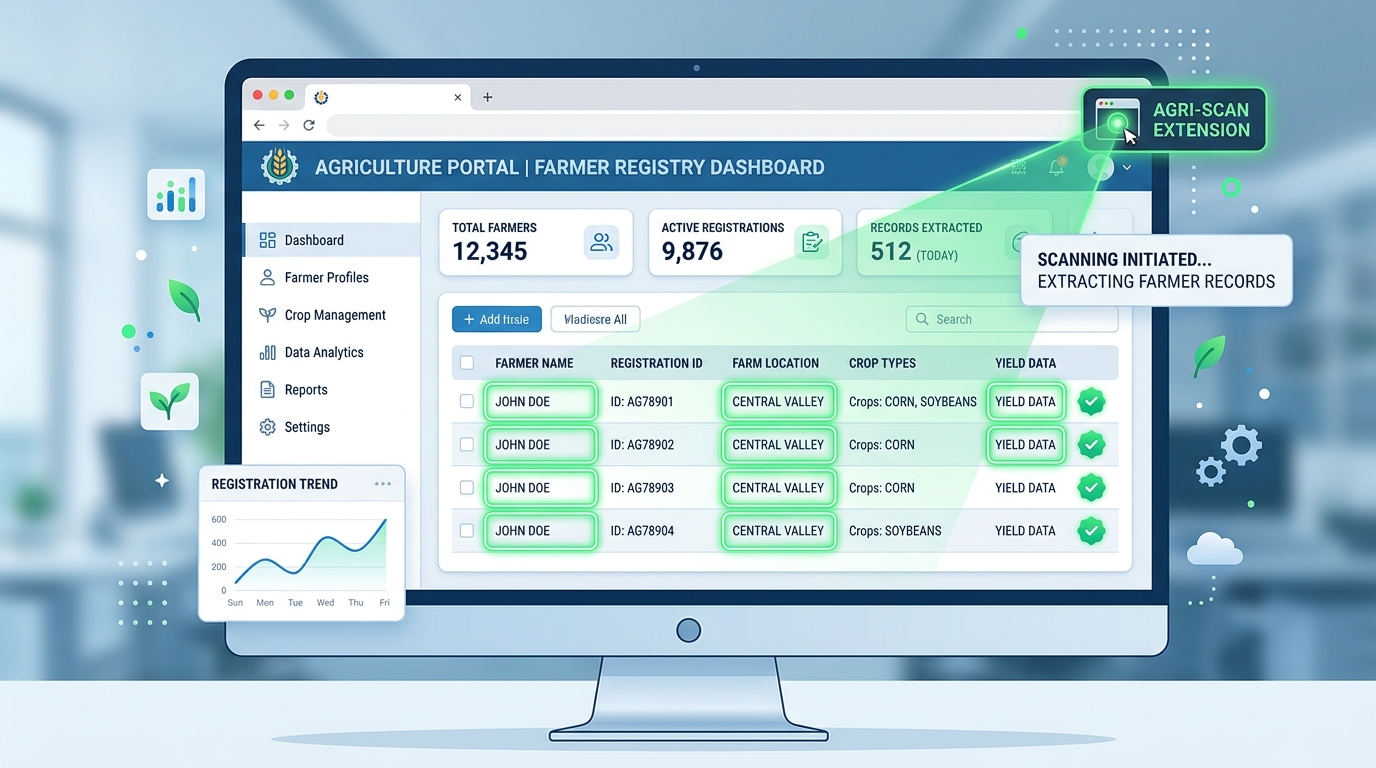 📸 Stage 1 • Portal Scanning & OTP Unlocked Data
1. Automated Portal Record Detection
After Aadhaar OTP verification unlocks the farmer record on the government portal, clicking the extension triggers the content script to instantly scan tabular data, Gurmukhi text fields, verification seals, and photograph with zero manual copy-pasting.
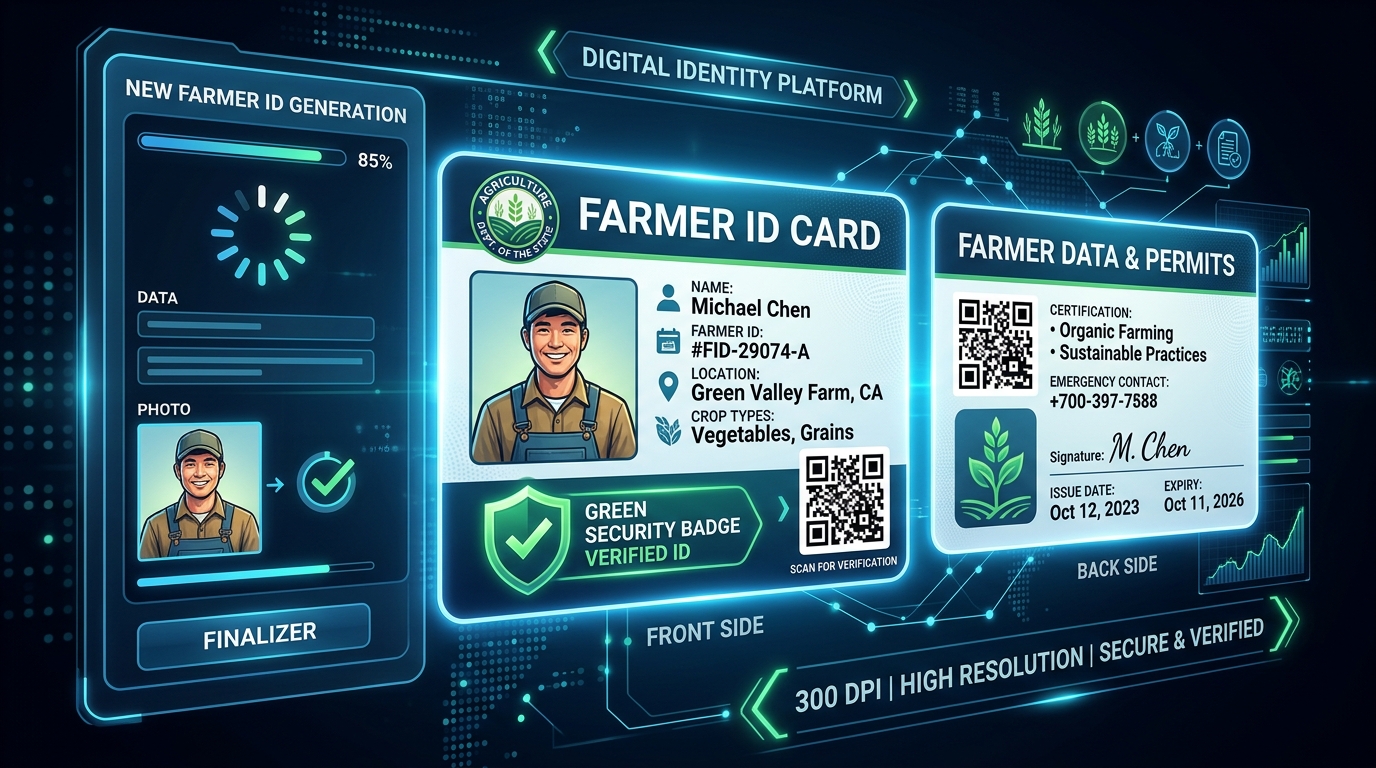 🖨️ Stage 2 • Instant Card Formatting & PDF
2. 300 DPI Dual-Side Card & QR Generation
The local formatting engine produces calibrated CR80 Front and Back ID cards with razor-sharp Punjabi typography, error-corrected QR code, and official verification badge. Generates and downloads the 300 DPI PDF instantly for PVC tray printing at ₹23 per card.
Install & Pin Browser Extension
Add AgriStack Card Helper to your browser in seconds. Pin it to your browser toolbar for instant 1-click access during daily operations.
Log in to Government Farmer Portal
Open the official state AgriStack or Punjab Farmer Registry portal in your browser and log in with your authorized CSC / VLE operator credentials.
Enter Farmer's Aadhaar / Registry ID
In the portal's search bar, enter the farmer's 12-digit Aadhaar Number, Application Number, or state Farmer ID to locate their registered profile.
Farmer OTP Verification & Profile Load
The portal dispatches a secure 6-digit OTP to the farmer's Aadhaar-linked mobile phone. Enter the OTP to unlock the full official farmer profile.
Launch Extension & Click 'Generate'
While viewing the unlocked farmer profile tab, click the AgriStack Helper icon in your toolbar and press "🖨️ Format & Generate PDF Card".
In-Browser Shaping & QR Checksum
The local engine shapes Punjabi Gurmukhi text conjuncts, renders the farmer photo, and builds an error-corrected Denso Wave QR code in browser memory.
Instant 1-Click Free Generation
Click "Generate Farmer Card (Free)" inside the popup. The 300 DPI high-definition PDF is generated and downloaded instantly with zero payment required.
Instant 300 DPI PDF Download & PVC Print
The 2-page print-ready PDF downloads to your computer. Print directly onto CR80 PVC cards using your Epson/Canon tray printer or thermal laminator.
How to Install Extension in Your Browser
Choose your web browser below for simple, step-by-step installation instructions.
Open Chrome Web Store
Click below to open our official verified listing at chromewebstore.google.com in Chrome, Brave, or Edge.
Click "+ Add to Chrome"
Click the blue "Add to Chrome" button on the official Web Store listing to start automatic installation.
Confirm Permission
When the browser dialog appears, click "Add extension" to approve browser extension permissions.
Pin to Toolbar
Click the puzzle icon in Chrome toolbar and pin AgriStack Helper for quick 1-click generation anytime!
🌐 Official Google Chrome Web Store
Direct 1-click installation with automatic updates verified by Google.
Open Add-on Page
Click below to open our official Mozilla listing at addons.mozilla.org in Firefox.
Click "+ Add to Firefox"
Click the blue "+ Add to Firefox" button on the official listing to start automatic installation.
Confirm Permission
When the Firefox browser dialog appears, click "Add" to approve browser extension permissions.
Pin to Toolbar
Click the puzzle icon in Firefox toolbar and pin Farmer Card for quick 1-click generation anytime!
🦊 Official Mozilla Firefox Add-on Store
Direct installation with automatic updates verified by Mozilla.
100% Free — In-Extension Generation
The extension is 100% free to download and install. Generate high quality 300 DPI print-ready Farmer ID card PDFs with simple ₹23 generation fee.
Pay-Per-Card Plan
ACTIVE IN EXTENSIONFor CSC operators, cyber cafes, and individual farmers. 100% free card generation.
- 100% Free Store Installation & 1-Click Setup
- Official ID Card PDF Generation (Front & Back Free)
- Full 300 DPI Print-Ready Layout (PVC Tray Calibrated)
- 100% Accurate Punjabi Gurmukhi Typography Shaping
- Official Denso Wave QR Code with Verified Seal
- Instant 1-Click Download directly inside Extension
- Direct WhatsApp Support: +91 70099 80800
🔒 Zero upfront cost. Extension is free to install and card generation is 100% free.
Merchant Policies & Software Agreements
In compliance with Payment Aggregator guidelines (RBI regulations), please review our transparent terms, data privacy protocols, refund window, and digital shipping policies below.
Terms & Conditions
Users purchase a digital software license/subscription to use the browser extension for formatting farmer registry records.
Privacy Policy
Farmer registry data is processed 100% locally on your machine. Payment transactions are secured by PCI-DSS Level 1 encryption.
Refund & Cancellation
7-day refund guarantee for technical failures. Raise refund requests by emailing support with your transaction ID.
Shipping & Delivery
Digital Product: License/access is delivered instantly via browser/email upon successful payment confirmation.
1.1 Overview & Legal Entity
AgriStack Card Generator Helper ("Software", "Extension") is owned and operated by GURINDER SINGH (Individual Proprietor), located at Bathinda, Punjab, India. By installing, accessing, or purchasing a subscription/license for AgriStack Card Generator Helper, you agree to be bound by these Terms and Conditions. If you do not agree, please do not use the extension.
1.2 Digital Software License
We grant you a non-exclusive, non-transferable, revocable license to use the AgriStack Card Generator Helper solely for formatting and generating farmer identity card documents from authorized government agricultural registries (such as Punjab Farmer Registry).
1.3 Permitted Use & User Responsibility
- You agree to use this software only on records and data you are authorized to view and print.
- You shall not use the software for fraudulent, misleading, or unauthorized alteration of government identity records.
- The software acts as a layout formatting utility; it does not issue legal identities. Verification of underlying record authenticity remains with the issuing authority.
1.4 Pricing & Payments
The extension is 100% free to download and use with simple ₹23 generation fee per card.
1.5 Limitation of Liability & Governing Law
The software is provided "as is". In no event shall GURINDER SINGH or AgriStack Card Helper or its creators be liable for indirect, incidental, or consequential damages. These terms are governed by the laws of India, under the jurisdiction of competent courts in Bathinda, Punjab, India.
2.1 Client-Side Local Processing
We take privacy with utmost seriousness. All farmer registry details, names, photographs, and land record parameters parsed by the extension are processed 100% locally on your own machine / browser sandbox. We do not store, copy, upload, or sell any applicant or farmer personal data to remote servers.
2.2 Payment Information Security
All payment transactions are conducted directly through authorized, PCI-DSS Level 1 compliant payment gateways. We do not collect, store, or have access to your credit/debit card numbers, UPI PINs, CVVs, or Netbanking passwords.
2.3 Data We May Collect
- Order & Transaction Identifiers: Gateway Payment ID, Order ID, and associated email for licensing verification, invoice issuance, and refund management.
- Anonymous Error Logs: Crash reports or formatting telemetry (if opted in) to diagnose browser layout compatibility bugs.
2.4 Contact Regarding Privacy
If you have any privacy concerns or request removal of transaction records, email GURINDER SINGH at igxrry@gmail.com or WhatsApp +91 70099 80800.
3.1 Digital Goods Policy
Since AgriStack Card Generator Helper is a digital software tool providing instant access and card generation upon payment, standard physical return processes do not apply.
3.2 Refund Eligibility Window
- 7-Day Guarantee: If the extension fails to format your card due to technical defects, portal layout changes, or payment double-deductions, you can raise a full refund request within 7 days of the transaction.
- Double Charges: Any duplicate payments caused by network timeouts will be refunded automatically or upon email notification.
3.3 How to Request a Refund
To initiate a refund, please send an email to igxrry@gmail.com or WhatsApp +91 70099 80800 with the subject "Refund Request - [Your Payment ID]" along with a brief description of the issue encountered.
3.4 Processing & Turnaround Time
Refund requests are verified within 24–48 hours. Once approved, the refunded amount is credited back to your original payment method (Bank Account, UPI, or Card) within 5–7 business days as per banking network standards.
4.1 Digital Product — No Physical Shipping
Explicit Declaration: AgriStack Card Generator Helper (operated by GURINDER SINGH) is a purely digital software product and workflow service. No physical goods or packages are shipped to your postal address.
4.2 Instant Delivery Mechanism
- Instant Generation: The generated print-ready 300 DPI PDF file is compiled and triggered for immediate download in your web browser within seconds of successful payment verification.
- License & Receipt: Digital license keys and payment confirmation receipts are delivered instantaneously via on-screen notification and emailed to the user's provided email address.
4.3 Delivery Timeline & Shipping Fees
Timeline: Instantaneous (0 to 60 seconds post-transaction).
Shipping
Charges: ₹0.00 (Free digital electronic delivery).
Support Contact: igxrry@gmail.com | +91 70099 80800.
Contact & Licensing Inquiries
Select your plan or reach out directly for custom operator licensing, technical setup assistance, and queries.
Merchant & Support Details
Reach out directly via email, phone, or visit our operating office below.
Frequently Asked Questions
Quick answers regarding extension installation, features, and in-extension card generation.
- Open our official Mozilla Add-ons page at addons.mozilla.org/firefox/addon/farmer-card/.
- Click the blue "+ Add to Firefox" button.
- Confirm the security prompt by clicking "Add".
- The extension is installed and ready to format Farmer ID cards immediately!
- Open our official Chrome Web Store listing at Chrome Web Store.
- Click the blue "Add to Chrome" (or "Get" on Edge/Brave) button.
- Confirm the security prompt by clicking "Add extension".
- The extension is installed and ready to format Farmer ID cards immediately!